
iOS 27 and Android 17 have both shipped, and the version numbers may not be the ones you expect. Apple now names releases by year, so this year’s is iOS 27, released 14 September 2026. Google’s is Android 17, codenamed Cinnamon Bun, generally available since 16 June 2026. This article skips the feature tour. Instead it covers what breaks, what is newly required, and which dates force work into your backlog.
The deadline that is actually close
Start here, because this one is weeks away rather than months. Google Play has required new apps and updates to target Android 16 (API level 36) since 31 August 2026. Teams that requested an extension have until 1 November 2026.
Miss it and you cannot ship updates. Consequently, if your Play Console shows that warning, this is the work that outranks everything else in the article.
There is a quieter rule underneath it. Apps targeting Android 14 (API level 34) or lower are no longer offered to new users on devices running a newer OS than the app targets. In other words, API level 35 is the floor for remaining visible at all.
Android 17 removes the large-screen opt-out
This is the biggest behavioral change of the year, and it lands on tablets and foldables.
For apps targeting Android 17 (API level 37), the system ignores your orientation and resizability declarations on any display wider than 600dp. That covers android:screenOrientation in all its portrait and landscape variants, setRequestedOrientation(), android:resizeableActivity="false", and both minAspectRatio and maxAspectRatio.
Android 16 offered a temporary opt-out. Android 17 deletes it. Therefore a portrait-locked app running on a tablet will be resized whether it was designed for that or not.
Three exemptions survive. Apps marked as games through android:appCategory are exempt. Users may opt back into an app’s requested behavior in the device’s aspect-ratio settings. Finally, screens at or below 600dp are unaffected, so phones are not in scope.
iOS 27 can refuse to launch an app without a scene manifest
Apple made the UIKit scene-based life cycle mandatory. From iOS 27, iPadOS 27, Mac Catalyst 27, tvOS 27 and visionOS 27, an app built with the latest SDK that lacks a UIApplicationSceneManifest will not launch.
Read the condition carefully, because it limits the blast radius. This applies to apps built with the latest SDK. An existing binary already in the store keeps running. However, the moment you rebuild — for a bug fix, for a new feature, for anything — the requirement applies.
Older UIKit apps that never adopted scenes are therefore carrying a hidden blocker. Accordingly, check for that manifest before you plan your next iOS release, not during it.
The Liquid Glass opt-out stops working
iOS 26 introduced UIDesignRequiresCompatibility, an Info.plist key that let teams defer the new design language. Build against iOS 27 and that key is ignored.
The new appearance therefore becomes unconditional on rebuild. If your team used that key to buy time, the time is up, and the visual QA pass you deferred last year now belongs in this release.
Four more iOS 27 changes that bite on rebuild
MetricKit lost a type. ScrollHitchTimeMetric and the matching MetricResult.scrollHitchTime(_:) case were removed from the Swift API. Notably, an existing binary referencing them can hit a missing-symbol crash unless recompiled.
SwiftUI’s @State is now a macro. Its initial-value expression no longer re-evaluates on every view re-instantiation. Usefully, the new behavior back-deploys to iOS 17, but some previously valid initialisers change meaning.
Background Neural Engine access needs an entitlement. Using it while backgrounded now requires com.apple.developer.background-tasks.continued-processing.inference.
Device-management TLS got stricter. From the 27.0 releases, the system processes handling MDM, device enrolment, configuration profiles, app installation and software updates enforce tighter TLS requirements on the servers they talk to. Consequently, this is an infrastructure task for anyone running their own MDM, not an app task.
React Native teams have a live build failure
Here is one you will not find in either platform’s release notes. React Native issue #58555, filed 16 September 2026 and still open, reports Xcode 27 builds failing on CocoaPods resource bundles.
The cause is narrow. React Native’s CocoaPods integration raises the deployment target on each pod’s native target but never on its resource-bundle targets, so those bundles keep whatever minimum their podspec declared. Xcode 27 then rejects anything outside its supported range, which the build error states as 15.0 to 27.0.
Importantly, this does not break React Native generally. A fresh project does not reproduce it, because React Native’s own pods declare a modern minimum. It bites only when you depend on a third-party pod that both declares a pre-iOS-15 platform and ships a resource bundle. Several popular ones do, including device-info, image-picker, SVG, async-storage and permissions packages.
The workaround is a Podfile post_install hook that re-floors every target, including resource bundles. Alternatively, staying on Xcode 26 avoids it entirely.
Xcode 27 itself has requirements
Two constraints matter for build infrastructure. Xcode 27 installs only on Apple silicon Macs, and it requires macOS Tahoe 26.6 or later. It ships Swift 6.4 alongside the iOS 27 SDK.
Consequently, teams still running Intel build machines have a hardware problem rather than a software one, and CI images need planning before the April 2027 SDK deadline below.
iOS 27 and Android 17: the deadlines further out
| When | What | Status |
|---|---|---|
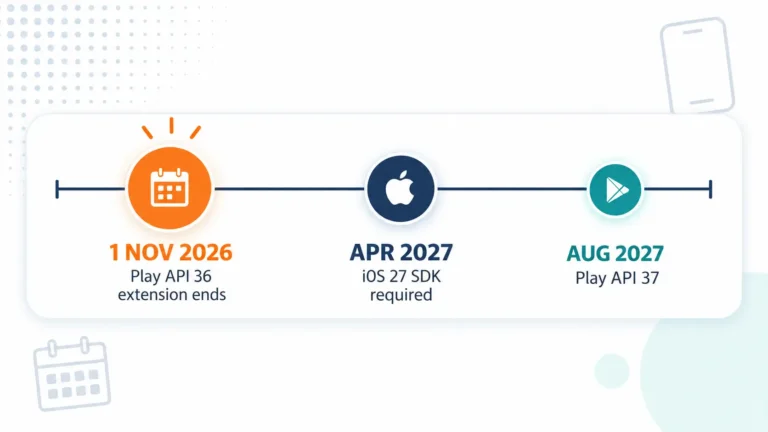
| 1 Nov 2026 | Play API 36 extension ends | In force |
| Apr 2027 | App Store Connect uploads must use the iOS 27 SDK | Announced |
| Aug 2027 | Play requires API 37, making large-screen resizability mandatory | Announced |
One caveat on the August 2027 date. Google has stated it in a developer blog post, but it does not yet appear in the Play Console target-API-level policy, which still stops at the 2026 requirement. Furthermore, Google published a month rather than a specific day. Treat it as directionally firm and check the policy page before you build a plan around it.
What to schedule this quarter
- Check your Play Console policy status today. If an API 36 extension is running, 1 November is the date that matters.
- Grep your iOS project for
UIApplicationSceneManifest. Its absence blocks your next build, not your current release. - Test on a tablet at more than 600dp. Assume your orientation lock is gone and see what actually happens.
- Budget visual QA for the new design language if you were relying on the compatibility key.
- Audit your CI images for Apple silicon before the April 2027 SDK requirement makes it urgent.
- React Native teams: check your pods for pre-iOS-15 platform declarations that ship resource bundles.
How Pegotec helps
We build and maintain native and cross-platform apps, so we track these deadlines as scheduled maintenance rather than emergencies. Furthermore, we would rather tell you a release is blocked in October than discover it in April.
If you need an audit of what these changes mean for an app already in the stores, talk to us, or read more about our mobile app development work.
Read next
- iOS App Store vs Google Play — fees, approval and implementation.
- Full-Stack Mobile Apps with Laravel and Flutter — the cross-platform stack.
- Flutter Development in 2026 — where the framework is heading.
FAQ
Let's Talk About Your Project
Enjoyed reading about iOS 27 and Android 17: What Developers Need to Know? Book a free 30-minute call with our consultants to discuss your project. No obligation.