
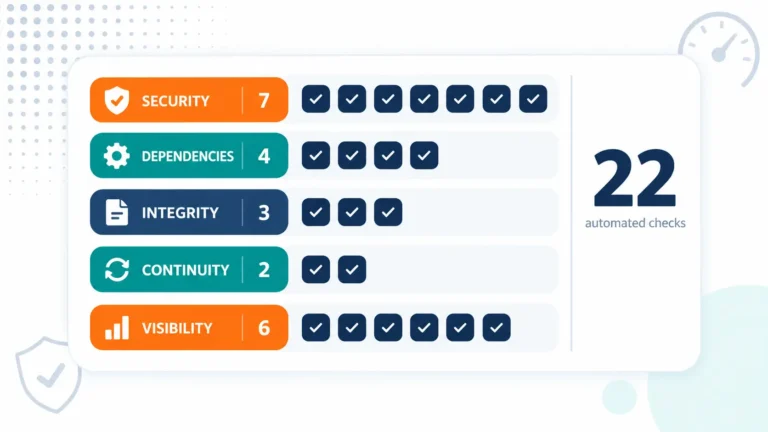
Managed WordPress maintenance is usually sold as three things. Plugin updates, backups, and uptime monitoring. That describes about a fifth of the work. This article lists what actually runs on our managed fleet—twenty-two automated checks—and the failure each one is meant to catch. Use it as a comparison sheet, no matter who you buy from.
Managed WordPress maintenance is a monitoring problem
The uncomfortable truth about a WordPress site is that nothing tells you when it quietly stops being the site you deployed. A plugin auto-updates and changes behavior. Someone edits a file directly on the server. A certificate approaches expiry. A staging copy drifts a year behind production.
None of that produces an alert by default. Consequently, the real product is not “updates” — it is a set of things that look, on a schedule, for conditions nobody would otherwise notice until a customer did.
Seven checks that watch the security surface
Security is where the count climbs fastest, because “is it secure” decomposes into several unrelated questions.
A hardening scan checks configuration against a baseline. A security headers check verifies what the server actually sends. That drifts whenever anyone touches a vhost. An exposure scan looks for things reachable that should not be, the .git directory being the classic. A secrets audit finds credentials committed where they do not belong.
Alongside those, malware detection ingestion pulls scanner output into one place. Fail2ban health confirms the thing blocking brute-force attempts is itself still running. A general security check covers the remainder. Notably, two of these watch the watchers. A monitoring tool that has silently stopped is worse than none, because it reports nothing either way.
Four checks that watch what you depend on
A WordPress install is mostly other people’s code, so dependency surveillance is its own category.
Composer-outdated reports what has moved. It then cross-references that against published vulnerability feeds rather than upgrading unthinkingly. A WordPress version fingerprint records what is actually running, not what someone believes is running. A license scan flags dependencies whose terms changed, a commercial risk that surfaces at audit time. The update process stages changes rather than applying them live.
Crucially, the decision of what to merge, hold, or skip stays with a person. Automation gathers evidence; it does not choose your risk appetite.
Three checks that catch drift
This is the category most contracts omit entirely, and the one that causes the worst surprises.
Drift detection compares deployed code against version control. Any difference is either a legitimate change nobody committed or an unauthorized one. Both need a human answer. Meanwhile, a staging freshness check catches the environment that quietly fell months behind production. That is how a tested release still breaks. A multisite topology check tracks network structure that changes without announcement.
Without drift detection, “we deploy from Git” is a belief, not a fact.
Two checks you will care about exactly once
A backup check verifies that backups exist, are recent, and are in the state they claim. The distinction matters. A job reporting success and a restorable backup are different things, and most teams discover the gap on the worst possible day.
An SSL expiry check watches certificate dates. That job is getting harder, because certificate lifetimes are shortening industry-wide, so manual renewal is on its way out regardless of anyone’s preference.
Six checks that keep the picture accurate
The rest keep the inventory accurate. Host discovery finds sites and servers that exist but were never registered. Most estates have some. Site metrics and server analytics snapshots build the history that makes a monthly report meaningful, not anecdotal.
Additionally, asset hygiene, crawlability, and framework detection checks catch the slow problems: orphaned media accumulating, a robots rule blocking something valuable. This application is not what the records say it is.
Findings become tickets with deadlines.
Checks that only produce a dashboard produce nothing. Each finding therefore opens a ticket at a priority, and each priority carries a deadline the platform tracks.
The useful part is that the deadline is visible and countable. A provider either has a number for how many findings are overdue or doesn’t measure it. Ask for that number when you buy. The honest answer is rarely zero, and a provider claiming zero is either very small or not looking hard.
What the volume looks like
To put a scale on it: across our fleet these checks produced 414 successful automated runs in a single twenty-four-hour period, against four failures. That is roughly one check every three-and-a-half minutes, continuously, across eight servers.
The point is not the number. It is that this cadence is not reachable by a person logging in monthly, which is what “maintenance” often means in practice.
What to ask a maintenance provider
- Do you detect drift? If deployed code is never compared against version control, nobody knows what is running.
- Do you verify backups, or just run them? A successful job is not a restorable backup.
- How do you decide what to update? Blind auto-update and never-update are both positions; neither is a policy.
- How many findings are currently past their deadline? A provider who cannot answer is not tracking it.
- Who monitors the monitoring? A check that silently stopped reports nothing, which looks identical to good news.
- What happens when staging drifts? If nobody measures it, your release testing is theater.
How Pegotec helps
We run these checks as proactive application maintenance rather than as a reactive support contract, and findings reach a person rather than a dashboard nobody opens.
If you are comparing maintenance proposals and want to know what is missing, talk to us.
Read next
- Software Maintenance Cost Percentage — what maintenance should cost as a share of build.
- The True Cost of Deferred Maintenance — what happens when none of this runs.
- Application Monitoring Services — the monitoring side in detail.
FAQ
Far more than updates, backups, and uptime, which describe roughly a fifth of the work. A complete service runs continuous checks across five areas: security (hardening, headers, exposure, secrets, malware, brute-force protection health), dependencies (outdated packages cross-referenced against vulnerability feeds, version fingerprinting, license changes, staged updates), integrity (drift between deployed code and version control, staging freshness, network topology), continuity (verified backups and certificate expiry), and visibility (host discovery, metrics history, asset and crawlability checks). Ask any provider which of those they actually run.
Drift detection compares the code actually deployed on the server against what is in version control. Any difference is either a legitimate change nobody committed, or an unauthorized one, and both need a human answer. It matters because without it, “we deploy from Git” is a belief rather than a verified fact. Files get edited directly on servers during incidents, plugins modify themselves, and hotfixes get applied and forgotten. Most maintenance contracts omit drift detection entirely, which is why it produces the worst surprises later.
No, and the difference tends to surface on the worst possible day. A backup job that reports success and a backup that can actually be restored are different things: the job can succeed while writing an incomplete archive, backing up the wrong path, or filling a destination that silently rejects new data. A backup check verifies that backups exist, are recent, and are in the state they claim to be in. When comparing maintenance providers, ask specifically whether they verify backups or merely schedule them.
Automation should gather the evidence, but a person should decide. Blind auto-update and never-update are both positions, not policies. A workable process reports what has changed, cross-references it against published vulnerability feeds and prior update history, then stages the change rather than applying it live—leaving a human to decide what to merge, hold, or skip. That keeps risk with the party who owns it, while removing the manual work of figuring out what changed in the first place.
Let's Talk About Your Project
Enjoyed reading about What Managed WordPress Maintenance Actually Involves? Book a free 30-minute call with our consultants to discuss your project. No obligation.