
The conversation about AI in software development almost always starts with code generation. Copilot demos, Cursor screenshots, and autonomous agents writing pull requests. Yet the place where AI in software planning quietly delivers the biggest return is not the keyboard at all. It is the messy, ambiguous work that happens before a single line of code gets written. Requirements that nobody fully understands. User stories that say everything and nothing—architecture decisions made under deadline pressure with half the information.
This is the first article in our five-part series on AI across the software development lifecycle. First, we will start where every project starts: planning. Above all, the goal is honest, not promotional. Specifically, we separate the cases where AI genuinely helps from those where it still falls short. As a result, you get a practical view of what to expect if you bring AI into your own planning process in 2026.
Why Planning Is the Underrated AI Use Case
Industry research consistently shows that the cost of fixing a requirements defect is dramatically higher than catching it during development. In fact, by some estimates, it is ten to one hundred times more expensive once the system is live. Most software projects fail not because the code is bad. Rather, they fail because the team built the wrong thing, or built the right thing for the wrong scale.
Planning is also where senior people spend disproportionate time. For example, a CTO sketching architecture. A product manager reformulating requirements. A tech lead is estimating a quarter of the work. Clearly, these are expensive hours—even modest improvements in clarity and speed at the planning stage compound across the rest of the project. In short, code generation saves minutes; better planning saves weeks.
The Five Planning Activities Where AI Helps in 2026
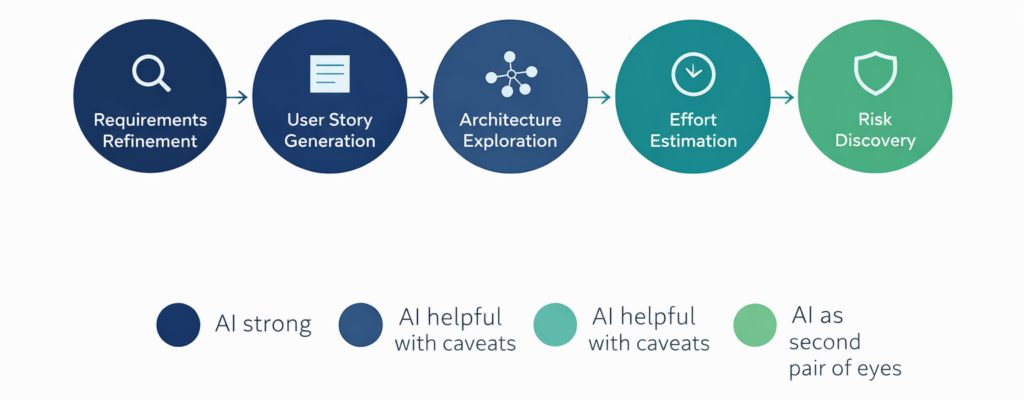
Across our own client work and 2026 industry data, five planning activities stand out. Notably, these are where AI consistently delivers measurable productivity gains. The size of the gain varies. However, the pattern of what AI does well versus poorly is consistent enough to plan around.
- Requirements refinement — turning vague stakeholder asks into testable specifications.
- User story generation — drafting first-pass stories with acceptance criteria
- Architecture exploration — comparing options and surfacing tradeoffs
- Effort estimation — calibrating estimates against historical data and reference projects
- Risk discovery — surfacing edge cases, integration issues, and assumption gaps
The first three are where AI has become genuinely transformative. In contrast, the last two need more careful handling. They are useful, but only when paired with human judgment grounded in real project history.
Requirements Refinement: Where AI Earns Its Keep First
Stakeholders rarely arrive with crisp requirements. They arrive with goals, frustrations, and partial pictures of what they want. The traditional gap is wide: from “we need a way to manage clients better” to a testable specification. Bridging that gap has always fallen to the most senior person in the room. Their tool is patient, probing questions.
In 2026, however, that role is increasingly being shared with AI. A modern AI assistant given a vague requirement will reliably produce a structured breakdown. For instance, expect questions about kinds of clients, data, actions, reporting, integrations, and permissions. As a result, the model catches questions a tired analyst might miss at the end of a long workshop. It does not replace the stakeholder conversation. Instead, it ensures that conversation covers more ground in less time.
The honest caveat: AI is excellent at handling a broad range of questions. However, it is weaker at the depth that comes from knowing your specific industry. For example, a model has not sat through your previous three failed integrations. Similarly, it does not know that your finance team will reject anything that does not export to their specific ERP. In practice, the combination works well: AI for breadth, human expert for depth. Together they produce requirements documents in days that used to take weeks.
User Story Generation: First Drafts in Minutes
The second high-leverage planning activity is user story generation. Once the requirements are reasonably clear, a competent AI model can produce a first-pass set of user stories in minutes. Acceptance criteria come attached. For a feature of moderate complexity, expect twenty to forty stories in that first pass.
Quality is not perfect. Roughly seventy percent of generated stories are usable as-is or with minor edits. About twenty percent need significant rewriting. Finally, the remaining ten percent are off-target enough to discard. Notably, that ratio is similar to what an experienced product manager produces in a first draft. That is the point. AI gets you to that draft far faster. As a result, the senior person is freed to focus on the hard cases and edge stories that genuinely require domain expertise.
Above all, one habit matters most: treat AI output as a starting point, never as a finished artifact. Otherwise, stories that reach your backlog without human review will mislead the development team weeks later. In short, the time saved in drafting must be reinvested in editing.
Architecture Exploration: AI as a Sounding Board
Architecture decisions are some of the highest-leverage choices in any software project. Clearly, they shape every subsequent decision and are expensive to reverse. Historically, these decisions have been made by a small number of senior people. Moreover, the conditions are usually imperfect: deadline pressure, incomplete information.
However, AI changes this not by making the decision for you, but by acting as a tireless sounding board. Describe your constraints: expected user volume, latency requirements, team skill set, budget, and integration landscape. In response, a current model will offer four or five viable architectures with the tradeoffs spelled out. In addition, it will surface options you would not have considered. Moreover, it will remind you of compliance and security implications you might have overlooked. For example, comparing a microservices approach against a modular monolith. The AI writes up that comparison with patient details, a senior architect might not have time for.
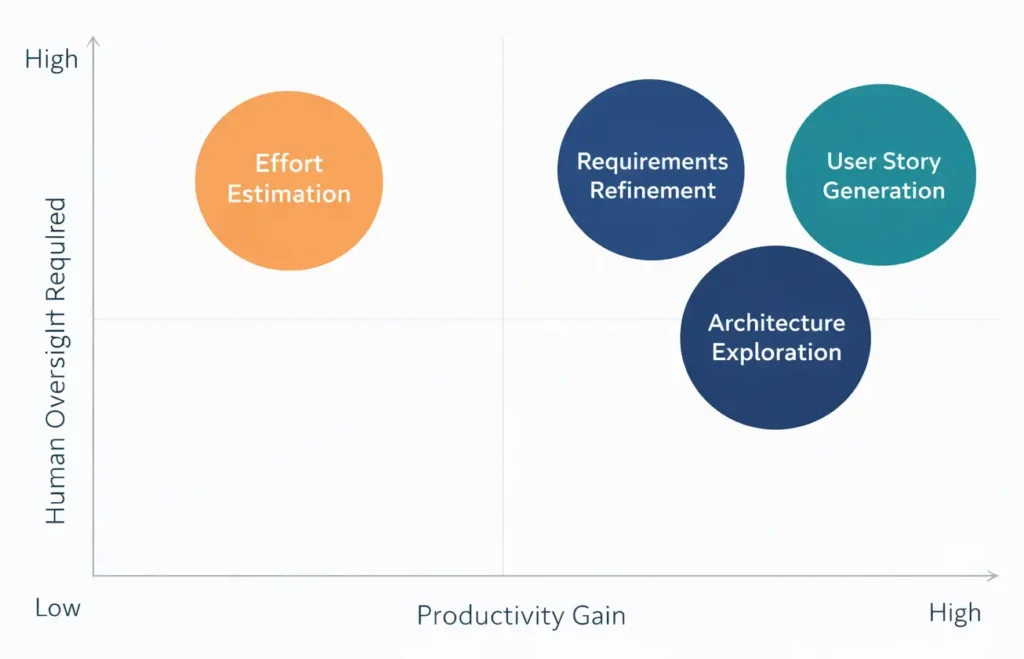
Still, it will not make a decision well on its own. AI lacks several things a senior architect brings. First, institutional context. Second, the political reality about who can maintain what. Third, pattern recognition from watching specific architectures fail in production. Therefore, use AI to explore the space; reserve the choice for the humans who will live with the consequences.
Effort Estimation: Useful, But Treat It as One Voice
Effort estimation is where AI is most often oversold and where teams most often get into trouble. Of course, a model can produce confident-sounding estimates for any feature you describe. However, the trouble is that those estimates come from patterns in training data. As a result, they do not reflect your team’s actual velocity or your codebase’s specific complexity. Moreover, they also miss the dependencies that only become visible once the work begins.
The right way to use AI for estimation is as a second voice in a planning poker session, not as the source of truth. Indeed, AI is good at pattern-matching new work against reference projects. For example: “This looks similar to a typical multi-tenant onboarding flow, which usually runs three to five weeks.” By contrast, what AI does not know is that your particular database schema will require two extra weeks of migration work. Therefore, combine the AI’s reference-class estimate with your team’s bottom-up estimate. Then treat any large gap between the two as a signal to investigate rather than average.
Risk Discovery: A Patient’s Second Pair of Eyes
Finally, the fifth planning activity where AI helps is risk discovery. Specifically, this is the systematic search for the things you have not thought of. In practice, give a model your draft plan. Then ask it to find the assumptions, the missing edge cases, and the integration points that will surprise you. Of course, it will not catch everything. However, it consistently catches things a tired team would miss at the end of a planning sprint.
Importantly, this is one of the highest-value uses of AI in planning precisely because it costs almost nothing. For example, a five-minute review of a plan against an AI checklist regularly surfaces one or two issues worth a serious conversation. Across a year of projects, that adds up to dozens of avoided incidents.
The Risks of AI-Driven Planning
The risks are real and worth naming clearly. First, AI-generated planning artifacts can sound polished while being subtly wrong. For example, a confident user story might miss a critical workflow. Similarly, an architecture comparison might omit the option you actually need. As a result, the fluency of the output can disguise the gaps. Second, teams that lean too heavily on AI for planning lose the deep context that comes from struggling through requirements together. Indeed, the struggle is part of how the team comes to share an understanding of the work.
Importantly, the mitigation in both cases is the same. AI accelerates planning. However, the conversations themselves still need to happen with the humans who will build, sell, support, and use the software. Otherwise, skip the conversations, and the speed gain becomes a loss of quality.
How to Introduce AI Into Your Planning Process
The practical playbook is straightforward. First, start with a single planning activity. Next, run it AI-assisted for two or three projects. Then measure both the time saved and the output quality. In practice, most teams begin with user story generation. The productivity gain is immediate, and the failure modes are easy to spot. Once the team is comfortable, expand to requirements refinement and risk discovery. Finally, architecture and estimation come last, with the most senior involvement.
For a deeper dive into cost considerations, see our companion guide to reducing AI costs without sacrificing AI power. Your choices about models, deployment patterns, and tools shape the cost of AI-assisted planning. They also shape the quality over time.
How Pegotec Helps
We help clients across Cambodia and the wider region introduce AI into their planning. Above all, the goal is to preserve the human judgment that makes good planning possible. In practice, that work is the focus of our AI project planning service. Specifically, it combines our standard discovery workflow with AI-assisted requirements refinement, story generation, and risk review.
This article is the first in a five-part series on AI across the software development lifecycle. The next article looks at AI in software development itself. It examines where code assistants actually earn their keep and where they get in the way. We then continue through testing, deployment, and maintenance. Want an honest read on where AI fits in your own planning? Contact Pegotec for a no-obligation consultation.
Conclusion
AI in software planning is not the headline-grabbing use case. However, for most teams, it is the one with the largest measurable return. Specifically, requirements get clearer faster. User stories arrive in days instead of weeks. In addition, architecture options surface that nobody had time to research. Finally, risks get caught before they become expensive incidents.
In short, the teams that get the most from AI in planning treat it as both a tool and a partner. First, a tireless first drafter. Second, a patient’s second pair of eyes. However, never be the decision-maker. The judgment, the context, and the responsibility stay with the humans who will live with the consequences. Meanwhile, the speed and the breadth come from the AI. Overall, that combination, used well, is what genuine productivity in 2026 actually looks like.
Frequently Asked Questions
No. Of course, AI accelerates the parts of product management that involve drafting, comparing, and structuring information. However, it cannot replace the judgment, stakeholder relationships, and institutional context that make product managers effective. As a result, teams that remove the PM role ship AI-generated stories that nobody has actually thought through.
The leading general-purpose models in 2026 — Claude, GPT, and Gemini in their most recent versions — all perform well here. In fact, they handle requirements refinement, user story generation, and architecture exploration equally well. Importantly, the choice between them matters less than how you integrate AI into your planning workflow. Of course, specialized project-management tools built on these models do exist. However, most teams find that a general-purpose model used inside a structured planning template delivers most of the value.
Realistic gains in 2026 are a 30 to 50 percent reduction in drafting time. Specifically, that covers requirements, user stories, and architecture comparisons. However, the gain is smaller for effort estimation — around 10-20 percent. By contrast, it is largest for risk discovery. For example, a five-minute AI review regularly catches issues that would otherwise have surfaced weeks later. Overall, total time savings depend on how disciplined the team is about reinvesting drafting time into review and conversation.
Only if the tool is configured to handle confidential data appropriately, in fact, public AI services may use submitted content for training unless explicitly configured otherwise. For confidential planning work, several options exist. First, use enterprise tiers with no-training guarantees. Second, deploy a self-hosted model—alternatively, strip identifying details before sharing. Importantly, the data classification should determine which tool you use, not the other way around.
First, start with user story generation on a single project. Importantly, the productivity gain is immediate. In addition, failure modes are easy to spot. As a result, your team learns quickly what to expect from AI output. Once that is comfortable, expand to requirements refinement and risk discovery. Finally, save architecture exploration and effort estimation for last. Above all, always keep your most senior people involved in those decisions.
Let's Talk About Your Project
Enjoyed reading about AI in Software Planning: From Requirements to Architecture in 2026? Book a free 30-minute call with our consultants to discuss your project. No obligation.