

Three years ago, AI code assistants were a novelty. Two years ago, they were a productivity claim. In 2026, however, they are simply part of how most software gets built. Yet the gap between marketing and measured reality remains wide. For example, vendors still talk about ten-times productivity gains. In contrast, developers actually using these tools report something more modest and nuanced.
This is the second article in our five-part series on AI across the software development lifecycle. First, we looked at planning in the first article. Now we turn to the code itself. The goal is the same: honest, not promotional. So, where do AI code assistants genuinely earn their keep in 2026? And conversely, where do they quietly cost more than they save?
The 2026 Landscape
The market has consolidated around a few serious options. For instance, GitHub Copilot remains the default for teams already in the GitHub ecosystem. Meanwhile, Anthropic’s Claude Code has become the reference for serious refactoring and multi-file work. Cursor and Windsurf, by contrast, compete in the agent-enabled IDE category. The assistant takes multi-step actions rather than single-line completions. Finally, JetBrains has shipped its own assistant deeply integrated into the IDEs that engineers already use.
Importantly, the functional gap between these tools has narrowed. As a result, most teams will get more from picking one and integrating it deeply. Indeed, constantly comparing options costs more than it returns. The marginal model, moreover, no longer determines productivity. Discipline around using it is.
Where AI Code Assistants Help
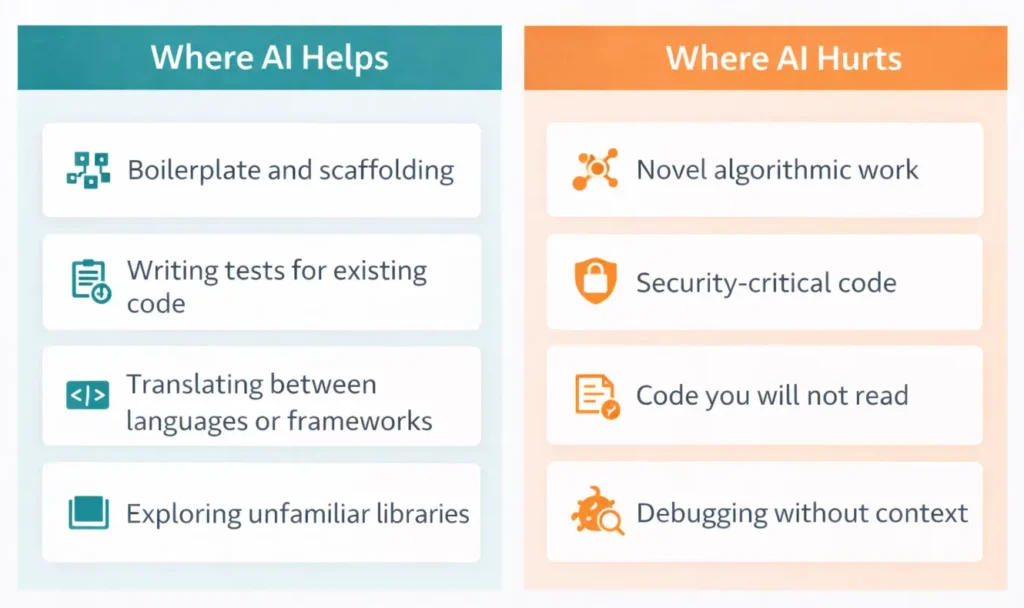
Specifically, four categories of work are where a competent 2026 code assistant reliably saves time. In particular, these are the areas with the clearest measured productivity gains in our own team. Broader industry data likewise agrees.
Boilerplate and Scaffolding
Notably, the largest and most consistent productivity gain is in the tedious work that every project requires. For example, think CRUD controllers, form validation, serialization logic, data transfer objects, database migrations, and API wrappers. This work is highly patterned and well represented in the training data. Furthermore, it is tedious enough that developers often introduce errors due to attention fatigue. AI assistants, in contrast, produce this code at speed and with high accuracy. As a result, realistic time savings on pure boilerplate are 50 to 70 percent.
Writing Tests for Existing Code
Indeed, generating unit tests for existing code is one of the highest-leverage uses of AI in 2026. Specifically, the model can read the function, reason about its branches, and produce a test suite in minutes—consequently, developers who previously skipped testing because of the time cost now write tests routinely. Coverage numbers across our own projects have, moreover, climbed meaningfully since we adopted this pattern team-wide.
Translating Between Languages or Frameworks
Moving a module between frameworks or languages used to be expensive work. The job, for instance, called for a senior engineer with experience on both sides. However, AI assistants now handle the first pass competently, preserving logic while adapting idioms. The senior engineer still reviews and adjusts, but the grunt work is done. Overall, that is a significant shift for teams modernizing legacy systems.
Exploring Unfamiliar Libraries
When a developer encounters an unfamiliar library, API, or framework, AI assistants dramatically shorten the learning curve. For example, ask for a minimal working example of a specific feature, and the model produces one. The result is usually correct, though sometimes outdated. Either way, it beats an untargeted search as a starting point. Of course, the developer still reads the official documentation to confirm. But the path from “I have never used this” to “I have working code” is much shorter.
Where AI Code Assistants Hurt
Importantly, the failure modes are just as critical as the productivity gains. Specifically, in four categories of work, AI assistants reliably produce confident-looking output. As a result, fixing that output often costs more than writing the code from scratch.
Novel Algorithmic Work
When the problem is genuinely new — not a variation of a common pattern — AI output becomes unreliable. Specifically, the model pattern-matches against something that looks similar. It then produces code that compiles, passes superficial review, and ships a subtle bug. This is the most expensive failure mode because it is hardest to detect. Therefore, for novel algorithmic work, start from first principles with a human. Use the AI only to double-check the final design.
Security-Critical Code
Authentication, authorization, cryptography, input sanitization, and session handling: AI assistants produce plausible code for all of these. However, some of that code contains real vulnerabilities. Although the 2026 tools have improved, they still regularly produce insecure patterns. This usually happens because the prompt does not explicitly call out the security requirement. Therefore, any security-sensitive code needs to be reviewed by someone with security expertise, regardless of its polish.
Code You Will Not Read
Above all, the single most dangerous habit is accepting AI-generated code without reading it. The code works, the tests pass, and the developer moves on. Later, someone discovers a bug that nobody on the team understands. Indeed, nobody actually wrote the code. This shows up most often in the bottom half of a team’s skill distribution. Consequently, it quietly accumulates technical debt that is painful to unwind. The rule is simple: if you cannot explain what the code does, do not merge it.
Debugging Without Context
AI assistants struggle with bugs that require more context than fits in their window. For instance, consider a subtle race condition, an intermittent production issue, or a deeply buried root cause. These still require a human who can hold the whole system in their head. Of course, the AI is useful as a sounding board. However, the actual debugging work remains firmly human.
The Senior vs Junior Divide
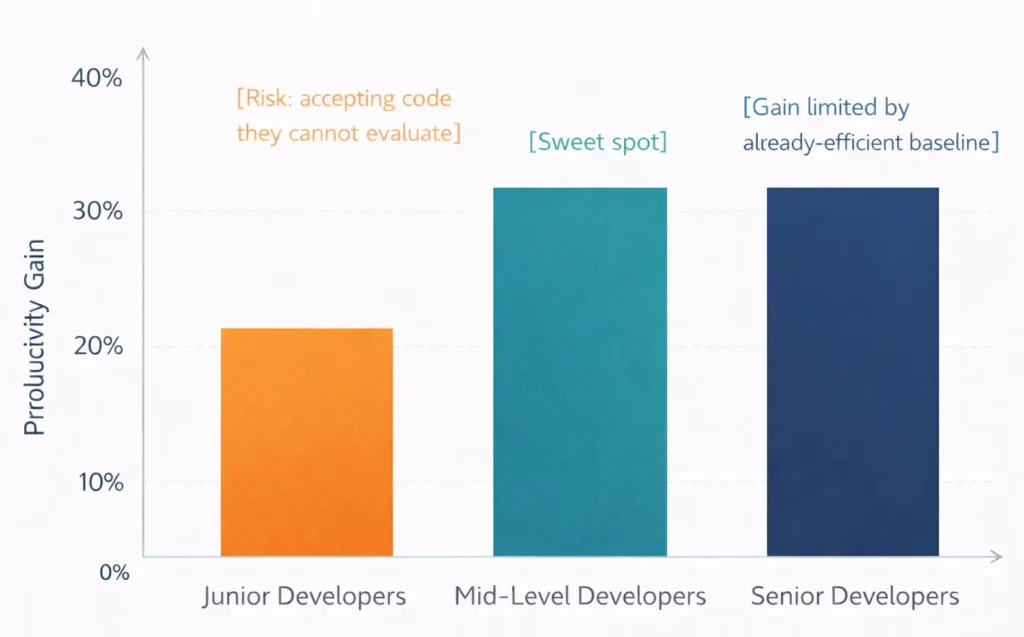
Notably, AI code assistants do not produce the same productivity gain for every developer on a team. In fact, the 2026 data is consistent: mid-level developers benefit the most. Specifically, they have enough experience to evaluate whether the AI output is correct. They also spend enough time on boilerplate-like work to gain significantly when that time shrinks.
By contrast, senior developers benefit less in raw productivity. Their time is already concentrated on the work AI handles poorly: novel problems, debugging, architecture, and mentoring. Instead, the gain shows up as faster onboarding into new codebases. Furthermore, it reduces context-switching cost when working across multiple systems.
Junior developers, however, are where the risk concentrates. The productivity gain is smaller, yet the risk of merging code that they cannot actually evaluate is larger. Therefore, teams that want to preserve their learning pipeline need explicit policies. First, juniors write without AI for their first months. Afterward, they use AI with one rule: explain every generated block during code review. Indeed, skipping this discipline produces developers who can ship code but cannot reason about it.
Managing AI-Assisted Development Well
The teams that get the most out of AI in 2026 share a few management practices. First, they set explicit norms about what AI handles and what it does not. For example, they keep security code, novel algorithms, and core architecture human-first. Second, they require that the merging developer read and understand every AI-generated block. Notably, code review enforces this expectation. Third, they measure outcomes, not AI usage. Specifically, the numbers that matter are velocity, defect rates, and the time saved by senior engineers on low-leverage work. The acceptance rate of completions, however, does not.
Cost is a factor worth watching in 2026, though less urgent than it was a year ago. For instance, a typical senior developer’s license runs in the low hundreds of dollars per month across the major tools. For a team of ten, moreover, this is a rounding error compared to a ten to thirty percent productivity gain. However, the more important cost consideration is data. Specifically, make sure your service does not send confidential code to training by default. In short, that means using enterprise tiers or self-hosted alternatives for sensitive work. For a deeper look at these tradeoffs, see our earlier guide on self-hosted versus API AI models.
How Pegotec Approaches AI in Development
Specifically, we have adopted AI code assistants across our team with explicit guardrails rather than a blanket rollout. For instance, AI now assists with the boilerplate and testing work that used to consume developer time. However, architectural work, security-sensitive code, and the parts most needing human judgment remain human-first. Furthermore, our code review process explicitly checks that every developer can explain what they merged. That holds regardless of who — or what — wrote it first.
As a result, we have seen a measurable improvement in throughput on routine work. Consequently, that frees our senior engineers to spend more time on the problems where human judgment matters. This, in fact, is the real promise of AI in software development. Not ten-times productivity, but a better allocation of the expensive human attention already on the team.
This article is the second in our five-part series on AI across the software development lifecycle. Next, we look at AI in software testing. In particular, test generation, flaky test detection, and visual regression are changing how teams build quality into their products. So, I want help thinking through how AI should fit into your development team. Then contact Pegotec for a no-obligation consultation.
Conclusion
In summary, AI code assistants in 2026 earn their keep on boilerplate, existing-code tests, translation work, and library exploration. Conversely, they quietly cost more than they save on novel algorithms, security-critical code, code nobody reads, and deep debugging. Notably, the difference between teams that gain and teams that regret is not which tool they picked. Rather, it is whether they have the discipline to read what they write.
Overall, the realistic productivity gain in 2026 is fifteen to thirty percent for most teams. That is not the vendor headline, but it is still a real and durable improvement. Indeed, the teams getting those numbers treat AI as a powerful tool. Useful, fast, and certainly capable of serious damage in the wrong hands.
Frequently Asked Questions
The serious options are GitHub Copilot, Anthropic’s Claude Code, Cursor, Windsurf, and the JetBrains AI Assistant. Notably, their functional gap has narrowed. As a result, the choice matters less than how you integrate it into your workflow. For example, teams already in the GitHub ecosystem often stay with Copilot. Heavy refactoring, by contrast, tends to favor Claude Code. Meanwhile, agent-enabled multi-step edits favor Cursor or Windsurf. In short, pick one, integrate it well, and stop switching.
Fifteen to thirty percent for most teams on most work. However, pure boilerplate and test generation see larger gains (50 to 70 percent in those specific tasks). By contrast, novel algorithmic work, security-sensitive code, and deep debugging see essentially no gains and sometimes losses. In fact, the vendors’ headline ten-times productivity claims do not match the measured reality in 2026 industry data.
Yes, but with structure. Indeed, juniors who use AI without understanding what it produces never develop the underlying skills. Importantly, those skills matter throughout their careers. The working approach is to have juniors write without AI for their first months on the team. Afterward, they use AI with one rule: explain every generated block during code review. As a result, this preserves the learning pipeline while still giving them the productivity benefit.
Only if you configure the tool appropriately, for example, public tiers of most tools may train on the code you submit unless you change the default settings. Therefore, for confidential or regulated codebases, use enterprise tiers with no-training guarantees, or self-host an open-weight model. Importantly, the data classification of your codebase should determine which tool you use, not the other way around.
No, at least not in the form some headlines describe. Specifically, AI code assistants in 2026 excel at patterned work that appears often in training data. However, they are poor at the parts that require holding a whole system in mind. Furthermore, they struggle with judgment calls about tradeoffs and understanding the business context around the code. Clearly, these remain human responsibilities. In short, the realistic effect is a shift in what developers spend time on, not the elimination of the role.
Let's Talk About Your Project
Enjoyed reading about AI in Software Development: Where Code Assistants Actually Earn Their Keep? Book a free 30-minute call with our consultants to discuss your project. No obligation.